
Everyone has ideas.
- Build a startup
- Launch a project
- Learn a new skill
- Organize life
But most of it never happens.
Not because people are lazy—but because execution is messy.
You start with motivation, then:
- tasks get unclear
- priorities get mixed up
- things get delayed
And suddenly, everything stops.
That’s the execution problem.
So What Is ActionBoard?
ActionBoard is not just another AI tool.
It’s a system designed to take a goal and turn it into something that actually moves forward.
Instead of just giving you suggestions, it:
- breaks your goal into steps
- organizes everything logically
- tracks progress
- and adapts as things change
Think of it like:
A smart system that doesn’t just think—it acts with you
Why Current Tools Fall Short
Let’s be honest.
Most tools today do one thing:
- Notion → organize
- Trello → track
- ChatGPT → generate
But none of them actually connect thinking + execution + adaptation in one flow.
You still have to:
- figure out the steps
- manage everything manually
- keep updating things yourself
That’s where ActionBoard changes things.
How ActionBoard Actually Works (Simple Breakdown)
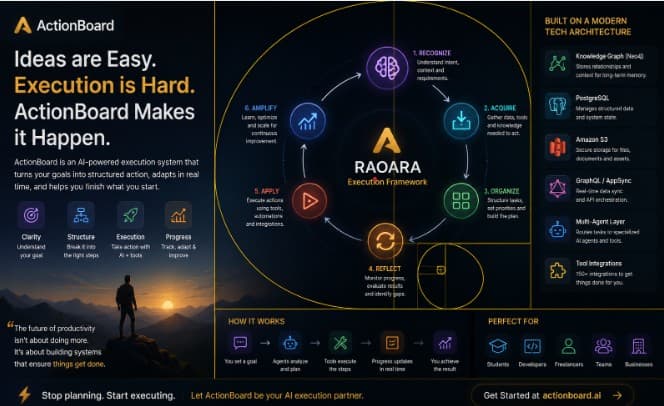
Behind the scenes, ActionBoard follows a structured flow:
1. Understand (Recognize)
You give it a goal like:
“Build a portfolio website”
It figures out:
- what you actually mean
- how complex it is
- what steps are needed
2. Gather (Acquire)
It pulls what it needs:
- information
- tools
- previous context
This is where it prepares to act, not just respond.
3. Plan (Organize)
Instead of a random list, it creates:
- step-by-step tasks
- priorities
- timelines
Basically, a clean execution roadmap.
4. Adjust (Reflect)
As you work:
- it tracks progress
- identifies delays
- updates tasks
So you don’t get stuck.
5. Execute (Apply)
This is the key difference.
It doesn’t just tell you what to do—it helps you do it:
- generate content
- create files
- schedule things
- update your board automatically
6. Improve (Amplify)
Over time, it gets better:
- learns your workflow
- adapts to your style
- becomes faster and more accurate
What’s Happening Technically (For the Curious Ones)
Without going too deep, here’s what powers it:
- Multi-agent system → different parts handle different tasks
- Knowledge graph → remembers context and relationships
- Tool integrations → connects with real actions (files, events, etc.)
- Real-time updates → everything syncs instantly
So it’s not just “AI answering”—it’s a system executing workflows.
Real Example
Let’s say you want to:
“Start a small online business”
Normally:
- you Google everything
- write random notes
- get overwhelmed
With ActionBoard:
- it breaks the goal into steps
- sets priorities
- creates tasks
- helps you execute each one
You move from:
“I want to start something”
to
“I’m actually building it”
Why This Matters for Students & Tech People
If you’re a student:
- you can manage assignments, projects, learning paths
If you’re into tech:
- you can plan builds, track dev tasks, manage workflows
If you’re trying to grow:
- you finally have a system that doesn’t just plan—it executes
Final Thought
The biggest problem today isn’t lack of information.
It’s lack of execution.
ActionBoard solves that by turning:
- ideas → into structured actions
- actions → into progress
- progress → into results
And that’s something most tools still don’t do.